
Publish a chart
The Publish button is part of the editor's publishing panel.

Clicking Publish generates the embed codes to be pasted into your CMS or elsewhere.

There are three ways to embed a chart on your page:
- Script (Recommended) makes the chart part of your page allowing it to be styled by you, and scales to automatically to fit screen size
- iframe includes the chart in your page through a window that has fixed height. Advisable only if your CMS does not support scripts.
- Embed links to the visualization only, covering the full page. Used when embedding toPowerPoint, or platforms such as Medium.
Republishing a chart
The chart publish status changes to Republish if a published chart is edited. Click Republish to apply new edits to published charts.
Unplublish a chart
Unpublishing a chart returns it to the saved state. Unpublishing a chart means it will not longer be visible wherever it is published.
- Expand the publishing menu
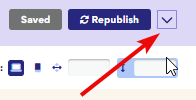
- Click Unpublish
- A warning appears asking you to confirm your choice. Click 'Yes, unpublish project'
Note: